Widgets Panel
The Widgets panel exposes notebook parameters defined with dbutils.widgets. Open it from the Widgets icon on the right rail of the notebook editor.
Parameters are what turn an exploratory notebook into something reusable. Rather than editing a hard-coded identifier every time somebody needs the same analysis for a different customer or a different date range, you declare the parameter once and whoever runs the notebook afterwards supplies the value from this strip.
We also use this mechanism to pass arguments into a scheduled run.
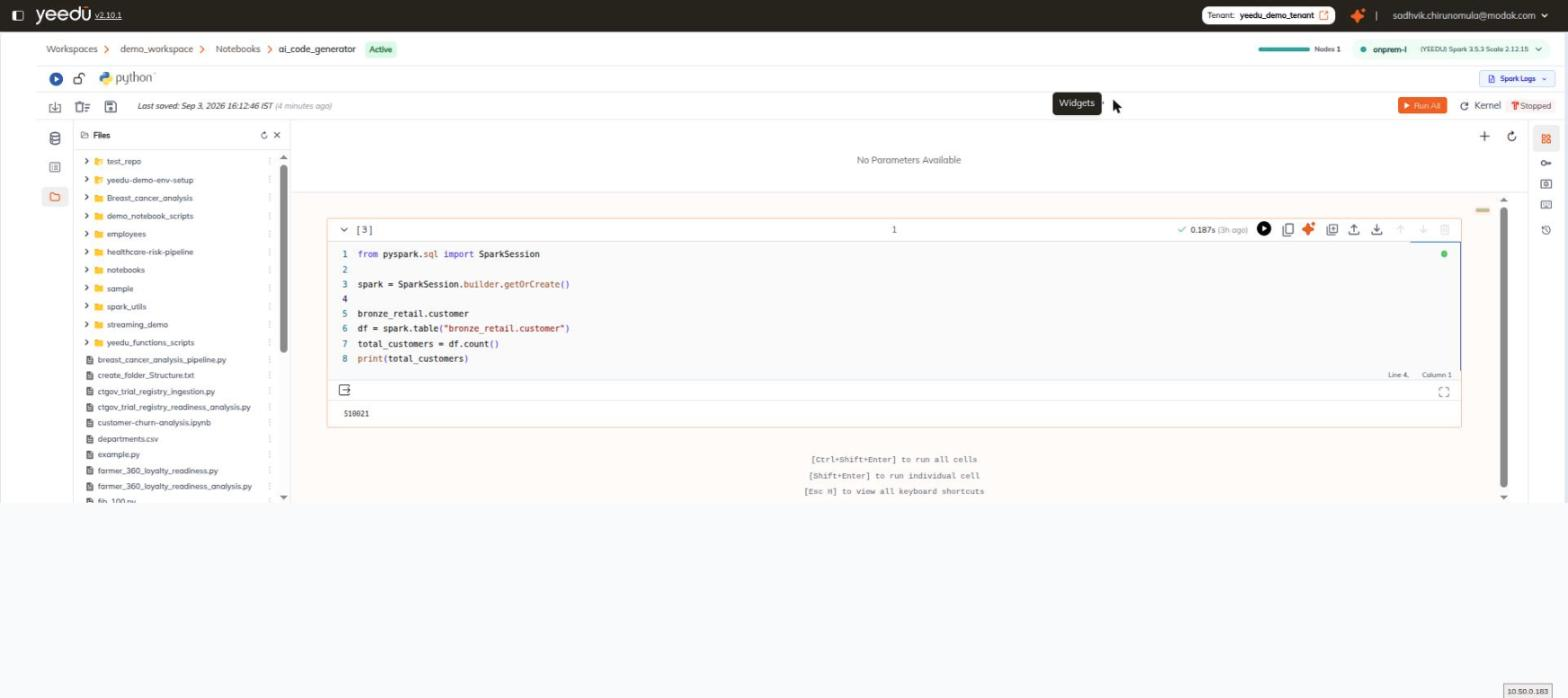
Layout
Unlike the other notebook panels, Widgets opens as a horizontal strip above the cells rather than as a side panel.
| Element | Detail |
|---|---|
| Empty state | No Parameters Available |
| + icon | Add parameter |
| ⟳ icon | Refresh parameters |
Populating the Strip
The strip is populated by dbutils.widgets calls after a cell executes:
dbutils.widgets.text("customer_id", "1", "Customer ID")
Read a value back in a later cell:
customer_id = dbutils.widgets.get("customer_id")
Run the cell that defines the widgets, then use Refresh parameters if the strip doesn't pick them up. Declaration happens at execution time rather than by static inspection, so a widget we've never executed the defining cell for simply doesn't exist yet.